

Claude connector & admin consent
Builders reach Sprig through a remote MCP connector: they sign in with their own work account, consent once, and their apps and data flow through the gateway as themselves. Three one-time steps make that possible: a tenant admin grants consent and populates the access groups, and a Claude org owner adds the connector.
What the installer created
Section titled “What the installer created”Running sprig infra install --domain <apps-domain> ... registers four Entra app
registrations and two security groups:
| Object | What it is |
|---|---|
sprig-gateway |
The API the builder’s token is issued for. Its Application ID URI is the gateway’s MCP URL. |
sprig-connector |
The confidential client you paste into the Claude org admin console (below). |
sprig-cli |
The public client Claude Code uses for native sign-in (loopback redirect). |
sprig-obo |
Lets the gateway act as the signed-in user against the database. Its secret lives only in Key Vault. |
sprig-users group |
Holds everyone who uses Sprig. The gateway’s builder and viewer roles are already assigned to it; membership is the only thing you manage (step 2). |
sprig-operators group |
Holds the Ops team (share approvals + the admin console). The platform API’s Ops role is already assigned to it; again, you manage only membership (step 2). |
The installer prints the connector client id and secret once, at the end of the run:
Claude org admin — add this remote MCP connector (surfaced ONCE): Client ID: **** Client secret: **** Auth URL: https://login.microsoftonline.com/<tenant>/oauth2/v2.0/authorize Token URL: https://login.microsoftonline.com/<tenant>/oauth2/v2.0/tokenStore the secret in your password manager immediately; Entra never shows it
again. If it is lost, rotate it with
az ad app credential reset --id <connector-client-id> and re-enter the new
value in the Claude console.
Step 1 - Grant admin consent (tenant admin)
Section titled “Step 1 - Grant admin consent (tenant admin)”The installer attempts this for you at the end of sprig infra install --domain <apps-domain> .... If the acting identity holds Global
Administrator or Privileged Role Administrator, the gateway’s delegated
permissions are consented tenant-wide automatically and you can skip this step.
The install log prints either “Granted tenant-wide admin consent…” or the exact
command to run if it could not. Run the command below only as that fallback (or
after adding a new delegated permission to the gateway):
az login # an account that can grant tenant-wide admin consentaz ad app permission admin-consent --id <gateway-client-id>This consents the gateway’s delegated permissions (Microsoft Graph sign-in and group read for the per-app access check, and the Azure SQL database permission it uses on each builder’s behalf). The connector and CLI are pre-authorized on the gateway scope, so no separate consent screen appears for them.
The gateway’s permission to call the platform API (what powers the Ops admin
console at https://admin.<apps-domain>) is consented automatically by the
installer; you don’t need to grant it here or re-run this command after an
upgrade for it to keep working.
Step 2 - Populate the access groups (tenant admin)
Section titled “Step 2 - Populate the access groups (tenant admin)”Two groups gate access, and both work the same way: an app role is already assigned to each group, so membership is the only lever:
sprig-users: the gateway’sbuilder/viewerroles. A signed-in user outside it authenticates fine but holds no role, and the gateway refuses them. Add everyone who should use Sprig.sprig-operators: the platform API’sOpsrole (approve/reject share requests, the admin console athttps://admin.<apps-domain>). Add only the Ops team.-o <ops-upn>at install already added that person.
az ad group member add --group sprig-users --member-id <user-object-id>az ad group member add --group sprig-operators --member-id <ops-user-object-id>Step 3 - Add the connector in Claude (org owner)
Section titled “Step 3 - Add the connector in Claude (org owner)”In the Claude admin console (Settings → Connectors → Add custom connector):
- Name:
Sprig. - Remote MCP server URL: your gateway’s MCP URL (
https://gateway.<apps-domain>/mcp). - OAuth Client ID / Client secret: the values the installer printed.
- Authorization / Token URL: the two URLs the installer printed.
- Save, then enable the connector for the workspaces that should have Sprig.
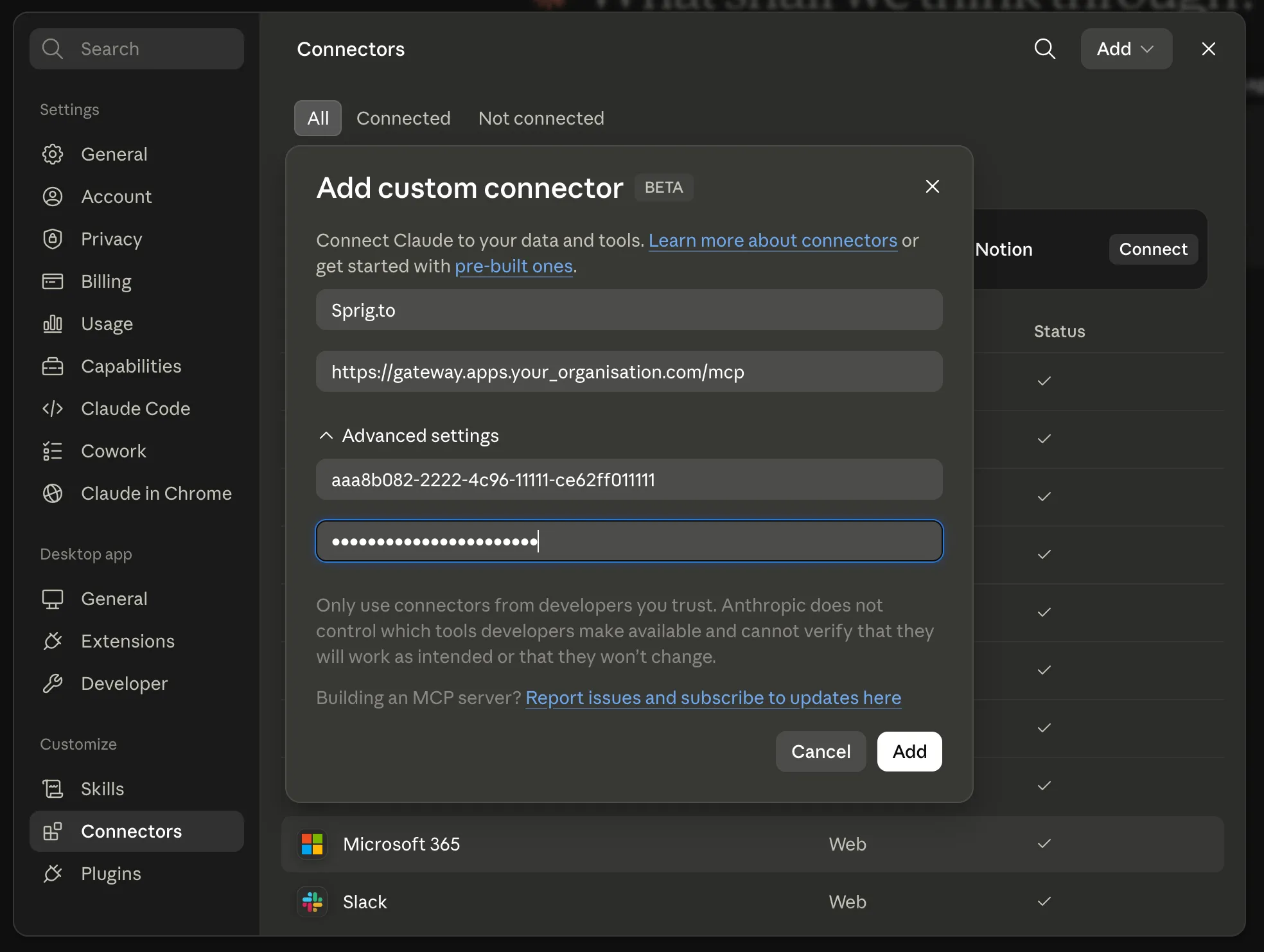
The same Add custom connector dialog appears under a personal Settings → Connectors on any plan, so you can verify the connector end to end as yourself before rolling it out. The client ID and secret go under Advanced settings.
Step 4 - First builder sign-in (per user)
Section titled “Step 4 - First builder sign-in (per user)”The first time a builder uses Sprig, Claude sends them through a normal Microsoft sign-in. They approve access once; Claude holds the resulting token and refreshes it silently thereafter. Nothing is installed on their machine and they hold no secrets.
To confirm end to end: enable the connector for your own account, open a new Claude conversation, and ask Sprig to list what you can see. A successful, authenticated response completes the connector setup.
Tool permissions
Section titled “Tool permissions”Once connected, Sprig’s tools appear under Settings → Connectors → Sprig, each with its own allow / ask / deny control. These controls decide when Claude may call a tool. They are a convenience, not the security boundary.
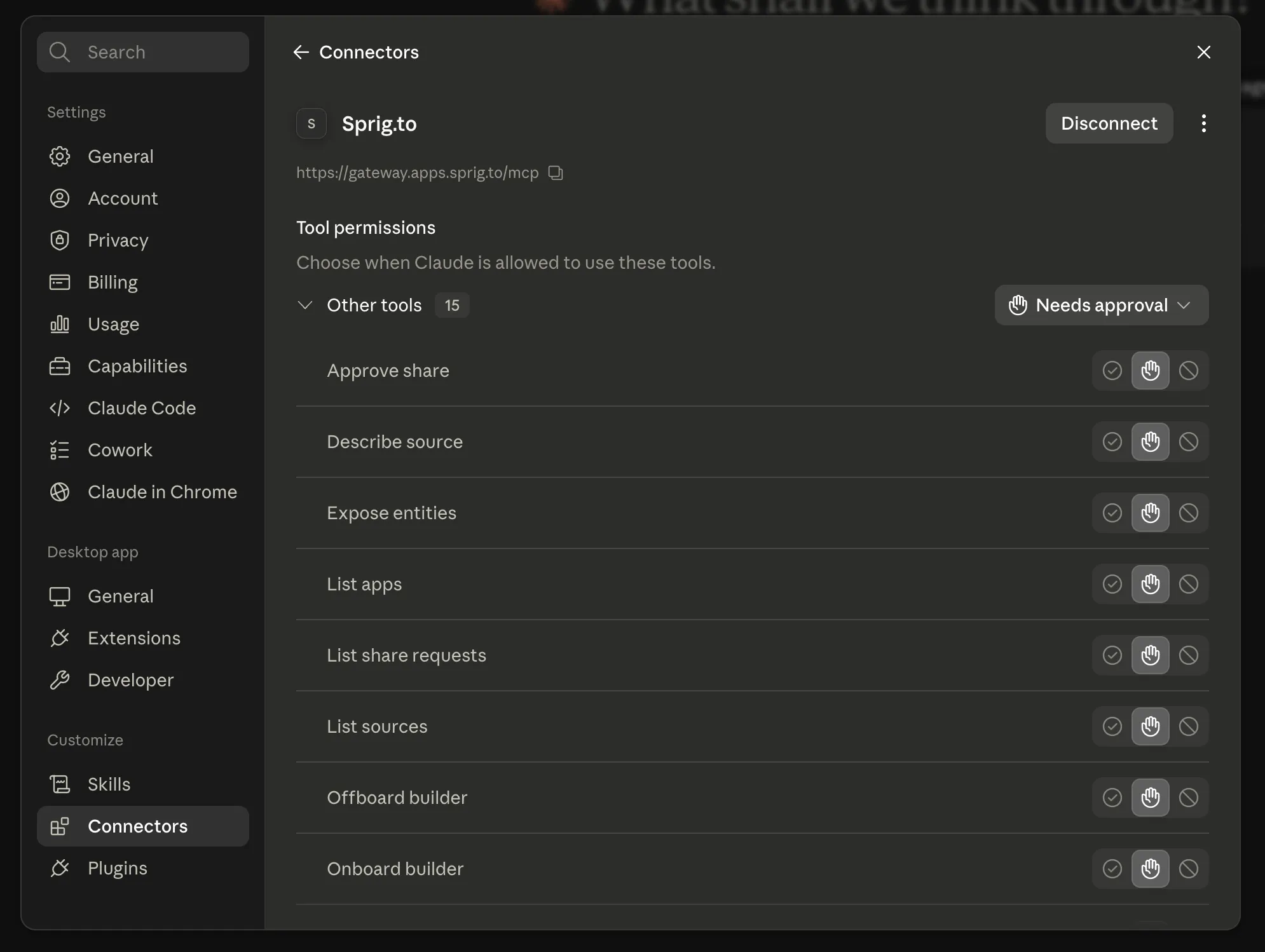
The administrative tools (Approve share, Onboard/Offboard builder, Expose entities, Register source) are listed for everyone, but authorization is enforced on the platform, not in this dialog: a builder without the Ops role is refused whatever the approval control shows. Builders succeed only at builder tools (list apps, publish, request a share); the Ops role is what unlocks the administrative ones, the same role that governs the Ops admin console.
Claude Code (optional, for builders on the CLI)
Section titled “Claude Code (optional, for builders on the CLI)”Builders who use Claude Code instead of claude.ai connect the same gateway as a
native client: no connector secret, just the public sprig-cli client id from
your install descriptor:
claude mcp add --transport http sprig https://gateway.<apps-domain>/mcp \ --client-id <cli-client-id> --callback-port 8899The first claude mcp login sprig opens the same Microsoft sign-in in a
browser and caches the token locally per user.